![white BN logo.png]](https://success.boomnation.com/hs-fs/hubfs/white%20BN%20logo.png?height=21&name=white%20BN%20logo.png)
People Board
Here, you can;
- View coworkers who have joined your account and the open invites for coworkers who still need to enter.
- Download a CSV list of coworkers active in the account.
-png.png?width=591&height=502&name=Group%20289762%20(1)-png.png)
Invite a coworker;
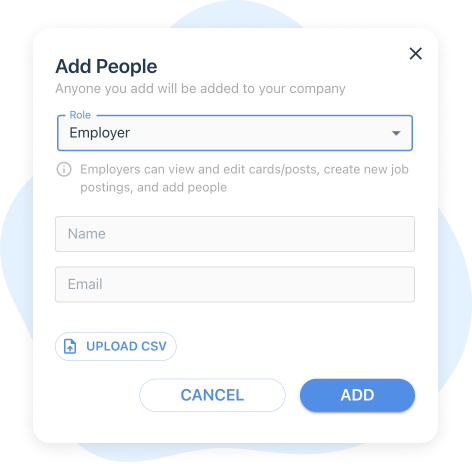
- Click the ⊕ symbol next to people.
- Choose Employer, enter their name and email, then click the ADD button.
- Upload multiple coworkers using the UPLOAD CSV button on the bottom left.
-
- Click "Accept Invite" to be sent to the BoomNation login page, then click "SIGN IN / CREATE AN ACCOUNT."
- Enter their work email to receive a login code.
- Then enter the code received in the email, and hit submit
- Click "Accept Invite" to be sent to the BoomNation login page, then click "SIGN IN / CREATE AN ACCOUNT."